How to Calculate FVIF in Excel
Whenever you need to project how much a lump-sum investment will be worth after a given number of compounding periods - whether it is a savings deposit, a reinvested dividend, or a deferred payout - the Future Value Interest Factor (FVIF) is the multiplier that gets you there. It expresses the compound growth of $1 over periods at a fixed rate , and every other time-value-of-money factor can be traced back to it.
This guide explains what FVIF represents, shows the closed-form formula, walks through computing it in Excel cell by cell, demonstrates how to verify the result with Excel’s built-in FV function, and includes a practical shortcut - the Rule of 72 - that lets you estimate doubling time in your head.
What Is FVIF?
FVIF is the amount that $1, invested today at a constant per-period rate , will grow to by the end of compounding periods.
Because it is defined on a $1 principal, it works as a pure multiplier. Once you know the FVIF for a particular rate and horizon, the future value of any lump sum under those same conditions is:
Two things to establish before using it:
- Rate and period must use the same time unit. If you are compounding monthly, is the monthly rate and is the number of months. If you are compounding annually, both are annual. Mixing an annual rate with a monthly period count is the most common source of error.
- FVIF applies to a single lump sum. If you need the future value of a series of equal periodic contributions, you want FVIFA (the annuity version), not FVIF. FVIF tells you where one deposit ends up; FVIFA tells you where a stream of deposits ends up.
The FVIF Formula
The closed-form expression is:
Where:
- is the interest rate per compounding period (e.g., 6% per year entered as
0.06, or a 6% stated annual rate converted to monthly as0.06/12). - is the total number of compounding periods.
The logic is direct: after one period your dollar becomes ; after two periods it becomes because the interest earned in the first period also earns interest in the second; the pattern repeats through periods. That snowballing effect - earning returns on prior returns - is exactly what compound growth means.
FVIF is greater than 1 for any positive rate and positive number of periods, and it grows faster as either or increases. At 8% per year, $1 roughly doubles in 9 years (FVIF ≈ 2.00) and roughly quadruples in 18 years (FVIF ≈ 4.00). Small changes in the rate compound into large differences over long horizons - which is why the assumed rate matters so much in any long-term financial projection.
Calculating FVIF in Excel
Setting Up the Inputs
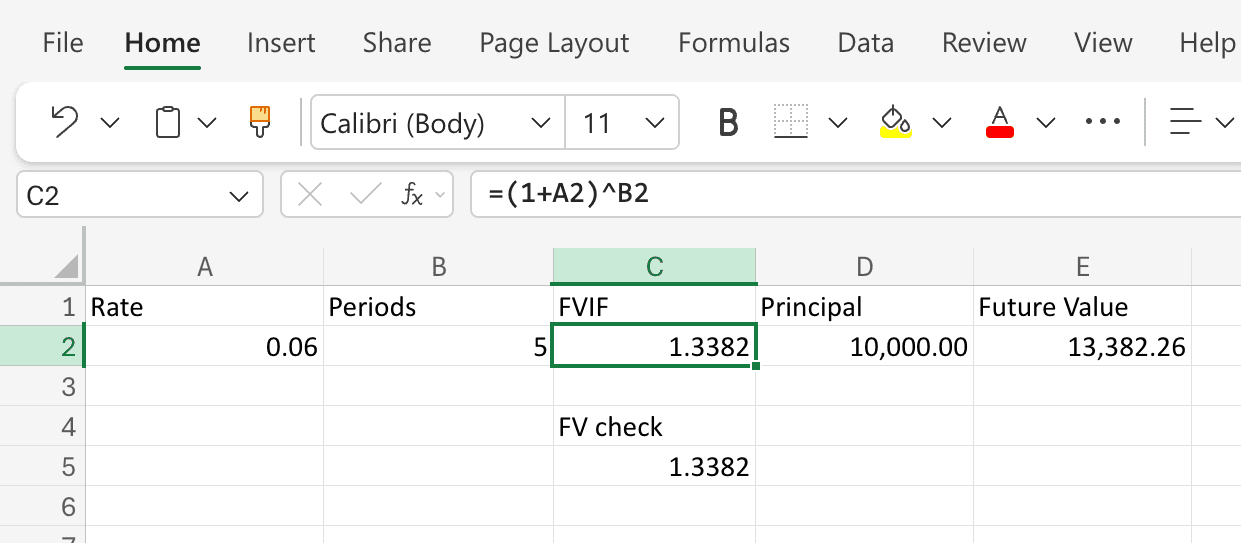
You only need two values: the per-period interest rate and the number of compounding periods. A clean layout looks like this:
| Cell | Contents |
|---|---|
A1 | Rate |
A2 | 0.06 |
B1 | Periods |
B2 | 5 |
C1 | FVIF |
C2 | (formula here) |
Step-by-Step
- Enter the rate in
A2. For an annual rate of 6%, type0.06. If you are compounding monthly with a 6% stated annual rate, type=0.06/12so the rate reflects a single compounding period. - Enter the period count in
B2. For 5 years of annual compounding, type5. For 5 years of monthly compounding, type=5*12(60 months). - In
C2, type the FVIF formula:
Press Enter. With=(1+A2)^B2r = 0.06andn = 5, Excel returns1.3382(to four decimal places). That is the FVIF - each dollar invested today will grow to about $1.34 in five years at 6%. - Optional: project the future value of an actual amount. In
D1typePrincipal, inD2enter the amount (say10000). InE1typeFuture Value, and inE2enter:
Excel returns=C2*D213,382.26, meaning a $10,000 investment compounding at 6% annually for 5 years grows to roughly $13,382.
Verifying With Excel’s FV Function
Excel provides a built-in FV function that can compute future value directly. Using it as a cross-check guards against formula typos.
In C4 type a label like FV check, and in C5 type:
=-FV(A2, B2, 0, 1, 0)
The arguments are:
rate- the per-period rate, same asA2.nper- the number of periods, same asB2.pmt- periodic payment,0because we are growing a lump sum, not a payment stream.pv- present value,1(the $1 that defines FVIF).type-0for end-of-period (the default, though it has no practical effect here since there are no periodic payments).
The leading minus sign converts Excel’s sign convention - it treats the initial investment as a cash outflow (negative) - so the result comes back positive. This should return 1.3382, matching the closed-form formula. If the two disagree, check for a rate-versus-period mismatch.
The Rule of 72: A Mental-Math Shortcut
One of the most practical things you can do with FVIF is estimate how long it takes for money to double. The Rule of 72 gives you a quick approximation without opening a spreadsheet:
Where is expressed as a whole-number percentage. At 6%, money doubles in roughly 72 / 6 = 12 years. At 9%, about 72 / 9 = 8 years.
You can confirm this in Excel. With r = 0.06 and n = 12, the FVIF formula returns (1.06)^12 = 2.0122 - just past the doubling mark. At r = 0.09 and n = 8, it returns (1.09)^8 = 1.9926 - just under 2, confirming the rule’s approximation.
The Rule of 72 is most accurate around mid-single-digit to low-double-digit rates, especially around 6% to 10%. Outside that range, the estimate drifts, but it remains a valuable sanity check when someone quotes a projected return and you want to quickly judge whether the claimed growth is plausible.
A Worked Example: Projecting a College Savings Deposit
You deposit $25,000 into an education fund that earns 5% annually. Your child starts college in 12 years. How much will the deposit be worth?
- Rate per period:
0.05 - Periods:
12 - FVIF:
- Future value:
Now suppose the fund earns 7% instead:
- FVIF:
- Future value:
That two-percentage-point difference in the return assumption adds more than $11,000 to the projected balance - a reminder that the rate you plug in carries more weight than the formula itself. Whenever you present a FVIF-based projection, stress-testing with at least one alternative rate is good practice.
Common Mistakes
- Rate/period mismatch. Using an annual rate with a number-of-months period count is by far the most frequent error. If your horizon is in months, divide the annual rate by 12 and express in months; or keep both annual.
- Entering the rate as a whole number. Typing
6instead of0.06turns a 6% growth factor into a 600% growth factor. Formatting the cell as a percentage does not change the stored value if you typed6. - Confusing FVIF with FVIFA. FVIF compounds a single initial deposit. FVIFA accumulates a stream of equal periodic deposits. Using FVIF when you meant FVIFA will dramatically understate the future value of a savings plan.
- Ignoring what the rate represents. FVIF is mechanical - it compounds whatever rate you give it. The judgment call is choosing the right rate. A guaranteed bank rate, a historical stock market average, and an optimistic venture projection all produce very different answers. Make sure the rate matches the risk profile of the investment.
Frequently Asked Questions
What is the difference between FVIF and Excel’s FV function?
They produce the same result, but through different workflows. FV is an all-in-one function that takes a principal directly and returns the future value. FVIF is the underlying multiplier for $1. If you need one quick answer, FV is faster. If you want to apply the same growth factor across multiple scenarios - say, projecting different deposit sizes under the same rate and term - computing FVIF once and multiplying is more efficient.
How is FVIF related to PVIF?
They are exact reciprocals. FVIF = projects a present dollar forward; PVIF = discounts a future dollar back. Multiplying FVIF by PVIF for the same always yields 1. If you have already computed one, the other is just =1/C2.
Do I still need printed FVIF tables?
Not for computation - the Excel formula is simpler and handles any rate or period count. Printed FVIF tables still appear in finance textbooks and exams, and they can serve as a quick sanity check when you want to confirm an order of magnitude without opening a spreadsheet.
Can I use FVIF for continuous compounding?
The standard formula assumes discrete compounding - once per period. For continuous compounding, the analogous factor is , entered in Excel as =EXP(A2*B2), when is a continuously compounded rate. If you start with a stated annual rate compounded times per year, the discrete factor is , which approaches as gets very large. Most corporate and personal finance work uses discrete compounding; derivatives and some banking applications use continuous.
How does inflation affect a FVIF projection?
FVIF gives you a nominal future value when you use a nominal interest rate. To see what the money will buy in today’s terms, either substitute a real (inflation-adjusted) rate into the formula, or compute the nominal future value first and then divide by , where is the expected inflation rate per period. Mixing nominal and real inputs in the same calculation is a common source of error.
What if the interest rate changes over time?
FVIF assumes a constant rate across all periods. If the rate varies - say, 4% for the first 5 years and 6% for the next 5 - compute the growth in stages: =(1+0.04)^5 * (1+0.06)^5. There is no single-factor shortcut for a changing rate, but chaining FVIF segments in Excel is straightforward.