How to Calculate PVIF in Excel
Many core finance calculations - discounting a future cash flow, valuing a bond, or comparing a lump-sum payout with installment payments - rest on the same small number: the Present Value Interest Factor (PVIF). It tells you what one dollar received at some future date is worth today, given an interest or discount rate. Multiply it by any future amount and you get that amount’s present value.
This guide covers what PVIF actually represents, the closed-form formula, how to type it into Excel, how to cross-check the result against Excel’s built-in PV function, and how PVIF relates to the discount factor used in DCF analysis.
What Is PVIF?
PVIF is the present value, today, of $1 received at the end of periods, assuming a constant per-period discount rate .
Because it is defined on a $1 future payment, it is a pure multiplier. If you know the PVIF for a given rate and horizon, the present value of any single future amount at that rate and horizon is simply:
Two things to pin down before using it:
- The rate and the period must match. If you are discounting a cash flow received in 24 months and you have a stated annual rate, either convert the rate to monthly (
annual / 12) or leave the rate annual and usen = 2years. Mixing them is the most common mistake. - PVIF applies to a single future cash flow. If you need the present value of a stream of equal future payments, you want PVIFA (the annuity version), not PVIF. For an irregular stream, discount each cash flow with its own PVIF and add them up.
The PVIF Formula
The closed-form expression is:
Where:
- is the discount rate per period (e.g., 5% per year as
0.05). - is the number of periods until the cash flow arrives.
The intuition is straightforward: $1 today, invested at rate , compounds to in periods. So $1 received in periods must be worth the reciprocal - - today. PVIF and the future value factor are mirror images of each other.
One consequence worth noting: PVIF is between 0 and 1 for positive rates and a positive number of periods, shrinks toward 0 as grows, and shrinks faster when is larger. A 6% rate cuts a 30-year cash flow to about 17 cents on the dollar; a 10% rate cuts it to about 6 cents. Over long horizons, small differences in the discount rate compound into large differences in present value - one of the core facts behind DCF valuation.
Calculating PVIF in Excel
The Data You Need
All you need are two numbers: the per-period rate and the number of periods. Lay them out like this:
| Cell | Contents |
|---|---|
A1 | Rate |
A2 | 0.05 |
B1 | Periods |
B2 | 2 |
C1 | PVIF |
C2 | (formula here) |
Step-by-Step
- Type the rate in
A2. For an annual discount rate of 5%, enter0.05. If you are discounting a monthly cash flow and have a stated annual rate, enter=0.05/12instead - the rate must match the period. - Type the number of periods in
B2. For a cash flow received in 2 years (with an annual rate), enter2. For a cash flow received in 24 months (with a monthly rate), enter24. - In
C2, type the PVIF formula:
Press Enter. For=1/(1+A2)^B2r = 0.05andn = 2, Excel returns0.9070(to four decimal places). That is the PVIF. - Optional: compute the present value of an actual future amount. In
D1typeFuture Amount, inD2enter the amount (say1000). InE1typePresent Value, and inE2enter:
Excel returns=C2*D2907.03, meaning $1,000 received two years from now is worth about $907.03 today at a 5% discount rate.
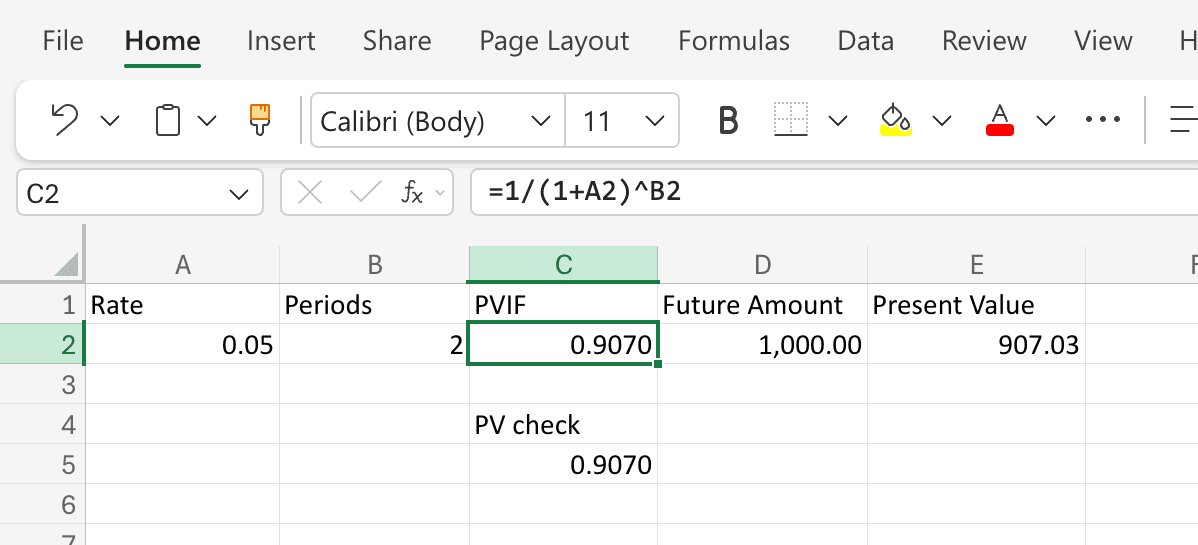
Cross-Checking With Excel’s PV Function
Excel’s built-in PV function can also compute the present value directly, which makes it a useful cross-check for your PVIF formula.
In C4 type a label like PV check, and in C5 type:
=-PV(A2, B2, 0, 1, 0)
The arguments are:
rate- the per-period rate, same asA2.nper- the number of periods, same asB2.pmt- the periodic payment,0because we’re valuing a single lump sum, not an annuity.fv- the future value,1(the $1 that defines PVIF).type-0for end-of-period (the default for discounting a single cash flow).
The leading minus sign flips Excel’s cash-flow sign convention (inflows vs. outflows) so the result comes back as a positive factor. This should return 0.9070 - the same PVIF you computed from the closed-form formula. If the two differ, you almost certainly have a rate/period mismatch to track down.
A Worked Example: Discounting a Bond’s Face Value
Suppose a zero-coupon bond pays $10,000 at maturity in 8 years, and the appropriate discount rate is 4% annually. What’s it worth today?
- Rate per period:
0.04 - Periods:
8 - PVIF:
- Present value:
If the bond is instead available for $7,000, the implied yield is slightly better than 4%, which would justify calculating the exact yield to maturity next. PVIF is the starting point: it is the factor that makes bond valuation and DCF analysis tractable.
PVIF and the Discount Factor
If you’ve read a DCF or bond-pricing textbook, you’ve probably seen the term “discount factor” (sometimes written as or ). The discount factor for period is exactly PVIF:
They are the same number with different names. “PVIF” is the term textbooks use when teaching time value of money from a personal finance angle; “discount factor” is the term practitioners use when valuing bonds and building DCF models. When you discount a stream of future cash flows , you are really just multiplying each one by its corresponding PVIF and summing:
That’s the entire machinery of discounted cash flow valuation, compressed into a single line.
Common Mistakes
- Rate/period mismatch. Using an annual rate with a number-of-months period count is the single most frequent error. If the cash flow arrives in months, either divide the stated annual rate by 12 and use the number of months, or keep the rate annual and use years (or fractions of a year).
- Entering the rate as a whole number.
5instead of0.05will give a nonsensical answer. Formatting the cell as a percentage does not change what you typed. - Confusing PVIF with PVIFA. PVIF discounts a single future cash flow. PVIFA (Present Value Interest Factor of an Annuity) discounts an equal-payment stream. Using PVIF where you needed PVIFA will understate the present value by a large margin.
- Forgetting to match the rate to the risk of the cash flow. PVIF is mechanical - it does whatever you tell it to do with the rate. The judgment question is which rate. A risk-free cash flow should be discounted at a risk-free rate; a risky one at a higher rate that reflects that risk. Using too low a discount rate is the most common way DCF models overstate value.
Frequently Asked Questions
What is the difference between PVIF and PVIFA?
PVIF discounts a single future cash flow back to today. PVIFA (Present Value Interest Factor of an Annuity) discounts a stream of equal future cash flows. PVIFA is just the sum of PVIFs over all the periods in the annuity - mechanically, PVIFA(r, n) = PVIF(r, 1) + PVIF(r, 2) + ... + PVIF(r, n).
What is the difference between PVIF and Excel’s PV function?
They compute the same thing, but PV is an all-in-one function that takes a future amount directly and returns the present value, while PVIF is just the multiplier for $1. If you only need one answer, PV is faster. If you want to apply the same factor to several different future amounts - as in building a DCF model - computing PVIF once and multiplying is cleaner.
What rate should I use?
Match the rate to the cash flow. For a risk-free cash flow (e.g., a Treasury), use a Treasury yield of matching maturity. For a corporate cash flow, use a rate that reflects both the time value of money and the default or business risk - typically a corporate bond yield or the firm’s weighted average cost of capital (WACC). Using a rate that’s too low is the single most common way to overstate present value.
Do I need to use PVIF tables anymore?
No. Printed PVIF tables were useful before spreadsheets because the formula involves an exponentiation that is tedious by hand. With Excel, the closed-form expression takes one cell. Tables are still occasionally useful as a sanity check or for textbook problems.
Can I use PVIF for continuous compounding?
The standard PVIF formula assumes discrete compounding once per period. For continuous compounding, the analogous factor is , which in Excel is =EXP(-A2*B2), when is a continuously compounded rate. If you start with a stated annual rate compounded times per year, the discrete factor is , which approaches as gets very large. Most textbook and corporate DCF work uses discrete compounding; derivatives pricing typically uses continuous.
How does inflation fit in?
PVIF gives you a nominal present value if you use a nominal discount rate, and a real present value if you use a real (inflation-adjusted) rate. The rule is to keep nominal and real inputs in the same system: discount nominal cash flows with a nominal rate, or real cash flows with a real rate. Mixing them is a common source of error.