How to Calculate FVIFA in Excel
If you are projecting the future value of a stream of equal payments, such as retirement contributions or recurring savings deposits, the Future Value Interest Factor of an Annuity (FVIFA) gives you the multiplier you need. Multiply that factor by the payment amount, and you get the future value of the full payment stream. It is one of the most reusable building blocks in time-value-of-money work, and Excel can compute it in a single cell.
This guide walks through what FVIFA actually represents, the closed-form formula, how to type it into Excel, how to cross-check the result against Excel’s built-in FV function, and the one subtlety - ordinary annuity vs. annuity due - that trips most people up. If you already know the inputs and just want the factor quickly, the FVIFA Calculator is the faster option.
What FVIFA Actually Measures
FVIFA is the future value, at the end of periods, of a stream of equal end-of-period payments, defined on a unit payment of $1, assuming a constant interest rate per period until the end of the horizon.
Because it is defined on a $1 payment, it is a pure multiplier. If you know the FVIFA for a given rate and horizon, the future value of any equal-payment stream at that rate and horizon is simply:
This is what makes the factor useful: compute it once for a given pair, then plug in whatever payment size you want.
Two things to pin down before using it:
- The rate and the period must match. If payments are monthly, is the monthly rate and is the number of months. If they are annual, both are annual. Mixing them is the single most common mistake.
- FVIFA assumes payments are made at the end of each period. This is the “ordinary annuity” convention. If payments are made at the beginning of each period (an “annuity due”), the factor is slightly larger, by a factor of . We cover this below.
The FVIFA Formula
The closed-form expression is:
Where:
- is the interest rate per period (for example, 5% per year as
0.05, or a 5% stated annual rate converted to a monthly rate as0.05/12). - is the number of periods.
The intuition is straightforward for an ordinary annuity: the first payment compounds for periods, the second for periods, and the last payment for zero periods because it is made at the end of the final period. Summing that geometric series gives the closed form above.
Calculating FVIFA in Excel
The Data You Need
All you need are two numbers: the per-period rate and the number of periods. Lay them out like this:
| Cell | Contents |
|---|---|
A1 | Rate |
A2 | 0.05 |
B1 | Periods |
B2 | 10 |
C1 | FVIFA |
C2 | (formula here) |
Step-by-Step
- Type the rate in
A2. If you want an annual rate of 5%, enter0.05. If payments are monthly at a stated annual rate of 5%, enter=0.05/12instead - the rate must match the payment frequency. - Type the number of periods in
B2. For a 10-year annual-payment plan, enter10. For a 10-year monthly plan, enter=10*12. - In
C2, type the FVIFA formula:
Press Enter. For=((1+A2)^B2-1)/A2r = 0.05andn = 10, Excel returns12.5779(to four decimal places). That is the FVIFA. - Optional: compute the future value of an actual payment stream. In
D1typePayment, inD2enter the payment amount (say1000). InE1typeFuture Value, and inE2enter:
Excel returns=C2*D212577.89, meaning $1,000 deposited at the end of each year for 10 years at 5% grows to about $12,577.89.
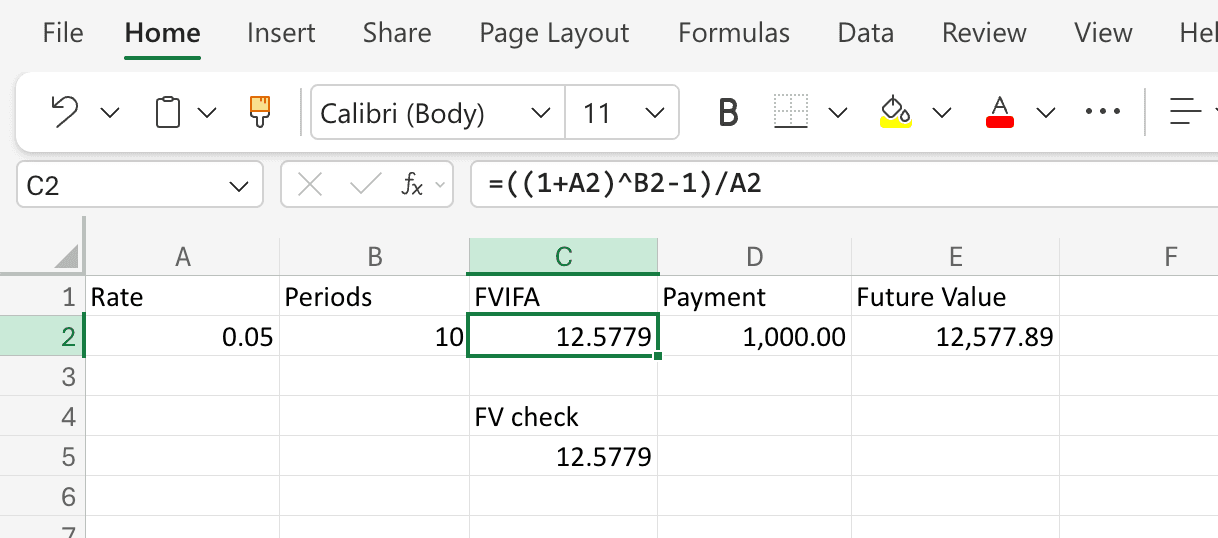
Cross-Checking With Excel’s FV Function
Excel has a built-in function, FV, that computes the future value of an annuity directly, without going through FVIFA. You can use it to verify your FVIFA calculation.
In C4 type a label like FV check, and in C5 type:
=FV(A2, B2, -1, 0, 0)
The arguments are:
rate- the per-period rate, same asA2.nper- the number of periods, same asB2.pmt- the payment per period. Enter-1because Excel uses the standard cash-flow sign convention; this returns a positive factor.pv- present value,0because we are only valuing the annuity, not an existing lump sum.type-0for an ordinary annuity (payments at the end of each period). Use1for an annuity due.
This should return 12.5779 - the same FVIFA you computed from the closed-form formula. If the two differ, you almost certainly have a rate/period mismatch or an annuity-due setting to track down.
Ordinary Annuity vs. Annuity Due
The standard FVIFA formula assumes payments occur at the end of each period (an “ordinary annuity,” which is the default setup for most textbook savings and payment problems). If payments instead occur at the beginning of each period (an “annuity due,” such as rent, many insurance premiums, or some retirement contributions), every payment gets one extra period of compounding, and the factor becomes:
In Excel, you can either multiply your C2 formula by (1+A2):
=((1+A2)^B2-1)/A2*(1+A2)
or let the FV function do it by setting the type argument to 1:
=FV(A2, B2, -1, 0, 1)
For r = 0.05 and n = 10, the annuity-due FVIFA is 13.2068 - about 5% larger than the ordinary version, exactly the extra period of compounding.
A Worked Example: Retirement Contributions
Suppose you contribute $6,000 at the end of each year to a retirement account for 30 years and expect a 7% average annual return.
- Rate per period:
0.07 - Periods:
30 - FVIFA:
- Future value:
If instead you contribute at the beginning of each year:
- Annuity-due FVIFA:
- Future value:
The roughly $40,000 difference shows what one extra period of compounding on every contribution can be worth over a 30-year horizon. This is one practical reason that contributing earlier in each period can matter.
Common Mistakes
- Rate/period mismatch. Using an annual rate with a number-of-months period count is the single most frequent error. If payments are monthly, divide the stated annual rate by 12 and convert the horizon in years into months as well.
- Entering the rate as a whole number.
5instead of0.05will give a nonsensical answer. Excel’s percentage formatting on the cell does not change what you type -5%and0.05are the same, but5alone is not. - Forgetting the annuity-due adjustment. If your real-world payments are at the beginning of the period, the ordinary-annuity FVIFA understates the future value by a full period of compounding.
- Confusing FVIFA with PVIFA. The Present Value Interest Factor of an Annuity answers the opposite question - what a stream of future payments is worth today - and has a different formula. FVIFA projects forward; PVIFA discounts backward.
Frequently Asked Questions
What is the difference between FVIFA and Excel’s FV function?
They compute the same thing, but FV is an all-in-one function that takes a payment amount directly and returns the future value, while FVIFA is just the multiplier for a $1 payment. If you only need one answer, FV is faster. If you want to apply the same factor to several different payment sizes, computing FVIFA once and multiplying is cleaner.
Do I need to use FVIFA tables anymore?
No. Printed FVIFA tables were useful before spreadsheets because the formula involves an exponentiation that is tedious by hand. With Excel, the closed-form expression takes one cell. Tables are still occasionally useful as a sanity check or for textbook problems.
What happens when the rate is zero?
The closed-form formula has r in the denominator and is undefined at exactly r = 0. In that edge case, FVIFA is simply the number of periods n - because with no interest, $1 deposited each period for periods is worth exactly at the end. Excel’s FV function handles this correctly; the algebraic formula requires a special case.
Can I use FVIFA for irregular payments?
No - FVIFA assumes equal payments each period. If your payments vary, build a cash-flow schedule and compound each payment individually to the horizon date instead of using a single annuity factor.
How do I handle inflation?
FVIFA gives you a nominal future value. To express the result in today’s dollars, either use a real (inflation-adjusted) interest rate in place of , or compute the nominal future value first and then divide by , where is the expected inflation rate per period. Do not mix nominal and real inputs in the same formula.
Why does the FVIFA formula look like a geometric series?
Because it is one. Each payment compounds for a different number of periods - the first for periods, the last for zero - and summing gives the closed form . Recognizing it as a geometric series is the cleanest way to remember the formula.